Pages

Showing posts with label FileKutz Creative Design Team. Show all posts

Monday, July 18, 2011

FileKutz Challenge and Free File

Welcome to FileKutz Design's we are holding our Monthly Challenge over at our Challenge Blog. I am offering a freebie file of my Flower Vine Border you can download it from our Challenge Blog! Just read all of the July Challenge post and see how you can join the FUN!!! And also: NEW!! No sketch you can use it how you want to!! On any project!!

The Free File comes in WPC, GSD, SVG, AI, KNK, MTC, PNG. If you'd like a SCUT2, ESP or other format for digital email me (I just don't add them to the zip files as they make the zip so large). 

Hope you have time to join us!! Entries can be made until July 31st!! And don't forget to follow the Design Team Blog so you can keep an eye out for all the WONDERFUL finished creativity these ladies share!!

Now each of the DT members have created a special project using the free file and did there own take on the July Challenge! You can see all of them on the Challenge Blog and on all the details on each ladies individual blogs!! So make sure you check those out!!  I just love what they did, and all of them brought something new to the look of the file cut!! Awesome job ladies :)

Now here is my take on the Challenge and the file:  I used a picture from my cousins wedding, which was one of my fav pictures from the wedding.  I had so much fun seeing and spending time with my Large family!! It was a blast and one wedding I will not forget :)  I have 15 cousins and almost seen ALL of them.  My cousin who got married was Just B.E.A. Utiful in her wedding dress! And she was just glowing and smiling all night long! I loved seeing her SO HAPPY!

Hope you all like my take on the challenge and the freebie file :)


Saturday, May 28, 2011

FileKutz Monthly Sketch Challenge

Welcome to FileKutz Design's we are holding our Monthly Sketch Challenge.   I am offering this freebie file of a Flourish Tag Frames DOWNLOAD IT HERE  Password is: iagreetouftf and the only rule is you must use it, or part of it on your card, layout or project.

The File comes in WPC, GSD, SVG, AI, KNK, MTC.  If you'd like a SCUT2, PNG format for digital email me (I just don't add them to the zip files as they make the zip so large)


To play along, just post your sketch project to your blog or gallery, follow our blog, then include a link in the InLinkZ  form at the bottom of this post so we can all easily find each other.  The winner will be choose on June 14th, so you have just a little over two weeks to work on your idea!!   Don't have a Blog? No worries, just email me your photo and description of what you did and used and I will post it on my blog for you and link it here.

The winner will win 5 free files of there choice from ANY of Filekutz Design's. You can see all of my design's between these two places HERE  and HERE .  

To qualify for the prize drawing, have your layout, card or  project linked here by midnight EST on Monday, June 13th .   To have a chance of winning this awesome prize, here's this weeks sketch for you to be inspired by in your entries... 

Sketch


Here is a picture of the Cut File offered for this challenge:


How about some samples to jump-start your creativity! Here's what our fabulous Design Team have made so far this week!


We hope you enjoy the sketch and have time to join in the fun with us!  Please remember to leave a direct link to your NEW creation's post with InLinkz below, not just your blog and include a link back to FileKutz Sketch Challenge in your post to be eligible to win this weeks fantastic prize. Thank you :)


Thursday, April 21, 2011

FileKutz Monthly Sketch Challenge w/ the DT

Welcome to FileKutz Design's we are holding our 1st ever Sketch Challenge over on our DT Blog.   I am also offering this freebie file of a Swirl Background for the Challenge. Password provided on the Sketch Challenge post.


**See ALL the details and enter the challenge HERE on the DT Blog**
We will be hosting this challenge every month!


The File comes in WPC, GSD, SVG, AI, KNK, MTC AND SCAL2.  If you'd like a PNG format for digital email me (I just don't add them to the zip files as they make the zip so large)


  The winner will be choose on May 9th, so you have just a little over two weeks to work on your idea!!  

The winner will win 5 free files of there choice from ANY of Filekutz Design's. You can see all of my design's between these two places HERE  and HERE .  

To have a chance of winning this awesome prize, here's this weeks sketch for you to be inspired by in your entries... 


Here is a picture of the Cut File offered for this challenge:


How about some samples to jump-start your creativity! Here's what our fabulous Design Team have made so far this week!


We hope you enjoy the sketch and have time to join in the fun with us on the DT Blog!  


I do have some tips for cutting files like this, with lots of small parts..

1. Make sure your blade is sharp or new.. I use a seperate blade for cutting like this that I swap out when I am done cuttin detailed cuts. 

2. Turn your paper upside down and do a double cut, it gives smaller cut a much better cut and if you have a white core paper you won't see the white core cutting upside down.  (Just make sure you flip your design, if needed)

3. If you have adjustable rollers on your machine move them to be on top of the paper, to hold in place better when doing a double cut. 

4. Ungroup or Unweld the whole file (if it is large and has small parts inside) and cut the inside pieces before you cut the outside stroke/line.  This will save you from cutting up your small parts and getting broking pieces on your finished background and small pieced files. 

5. If your 1st cut don't come out well, inlarge the or outline the outside stroke just a little, then delete/remove the original outside stroke,  then cut small pieces 1st, then cut the new outline you made. 

6. Some machine's are just not cut out for cutting small pieces.. if this is the case with your machine and you can't cut a file of mine because of small pieces, email me and tell me about it, your issue and the machine/program you use, and I will see if I can redesign with a little larger pieces (I can usually do this in most cases).. as I have a few times before for a customer who uses a Silhoutte machine and has to cut smaller due to the max cutting of 11x8".

**Please do not post your layouts, cards or project here, go to the full description and post HERE on the FileKutz DT Blog.**


Thursday, April 7, 2011

Have you seen our New DT Blog??

FileKutz has a new DT blog, all things FileKutz!! The DT has been really busy posting new layouts, so I invite you to check out ALL of the new projects and follow the new blog.  The layouts and cards of these ladies are so inspiring!!

Here is the lastest new layout Posted By Angela!!

I've been working feverishly to finish up my Bald Eagle scrapbook by the time we leave here in two weeks. It's been great fun, but I will be glad to get back to some different types of layouts and be able to start on our trip through Alaska last summer.  The Bald Eagle scrapbook will contain 28 layouts.

LOOK OUT BELOW - October 31, 2010 - Haines, Alaska JOURNALING:  Bald Eagles battle for a salmon meal in the last run of the season.PHOTOS:  Bald Eagle images by Shetzers Photography SUPPLIES USED:  K&Company Julianne patterned paper and mats, Kraft cardstock, Ranger Tim Holtz Distress ink (Antique Linen, Weathered Wood), Judikins Treasure Cube and Textiles Cube stamp, DCWV Neutrals cardstock, Bazzill Basics Just the Edge, Stampin Up Notes and Details and Dot Dot Dot stamps, Eagle cut file by FileKutz by LisaJane, Smooch pearlized ink, Sketch by PageMaps 2 (page 104), Font: Evie's handTECHNIQUE TIP:  I used four different borders by Bazzill on this page.  Two of them started out being off white so I used my stamps and inks to colorize them and add more texture to the layout.  Another one started out to be off white and I decided that a pale blue would give a bit more seperation to the zig zag border so I sponged some of the Tim Holtz weathered wood ink onto it to recolor it.  The bluish textured flowers also started off in plain off white and with my stamps, I blended them in with the theme of the layout.


LOOK OUT BELOW - October 31, 2010 - Haines, Alaska

JOURNALS: Bald Eagles battle for a salmon meal in the last run of the season.

PHOTOS: Bald Eagle images by Shetzers Photography

SUPPLIES USED: K&Company Julianne patterned paper and mats, Kraft cardstock, Ranger Tim Holtz Distress ink (Antique Linen, Weathered Wood), Judikins Treasure Cube and Textiles Cube stamp, DCWV Neutrals cardstock, Bazzill Basics Just the Edge, Stampin Up Notes and Details and Dot Dot Dot stamps, Eagle cut file by FileKutz by LisaJane, Smooch pearlized ink, Sketch by PageMaps 2 (page 104), Font: Evie's hand

TECHNIQUE TIP: I used four different borders by Bazzill on this page. Two of them started out being off white so I used my stamps and inks to colorize them and add more texture to the layout. Another one started out to be off white and I decided that a pale blue would give a bit more separation to the zig zag border so I sponged some of the Tim Holtz weathered wood ink onto it to recolor it. The bluish textured flowers also started off in plain off white and with my stamps, I blended them in with the theme of the layout.

Here is a closeup of the wonderful cut file from LisaJane at FileKutz.  What a great way to finish off this layout.

To purchase this wonderful file, please click on the photo above to be taken to the website..

Wednesday, April 6, 2011

Have you seen this!! ScrapCalls!!

I just wanted to share a wonderful blog I just recently found, becasue of a fellow VDBC designer, Sharon... called Scrapbook Calls.   ScrapCalls is the place to find information about calls, contests and challenges that are happening in the scrapbook world.

It is also free to submit Design Team calls, Magazine Calls Challenges and Contests to be posted on the blog, if no purchase of items is required.

I highly recommend checking this blog every few days to anyone who likes to scrapbook.. there are some awesome challenges, contest, giveaways ect and something for everyone!

I also just put a recent call out for a Sketch Designer to join my DT.. so if you are interested please check out the details HERE and contact me :)

Enjoy :) ~LisaJane~


Tuesday, March 15, 2011

Announcing Creative DT Member

I would like to welcome back Kelly S as a continuing Creative DT Member and to My 4 new Creative DT members: Eve S, Ronnie, Tammy L, and Angela S, Sharon S to my Creative team, a big welcome ladies.  I am very excited to have you ALL working with me and can't wait to see what you come up with using my files. 

 I have seen these ladies projects and they are all very talented, so keep checking back for some of there awesome work.  You can see all of there Bio's, Blog's and current scrapbooking, cards and craft's using the links on the Creative DT Bio Page or from Links on the FileKutz Creative DT Blog

Welcome Ladies!! Excited to be working with you ALL!!!

Wednesday, November 3, 2010


Down The Hill We Go!!

Here is a layout I did using Down The Hill We Go File From FileKutz By LisaJane.  The picture is of my 2 oldest boys, taken about 9 years ago!! But was the perfect pic for the Layout.


Monday, September 27, 2010

A Sneak Peak of My 2010 Halloween Book

Using my Bind-It-All and FileKutz By LisaJane Files

Well October is almost here!! And you all know how much I love Halloween.. I have already started my 2010 Halloween Book for my boys..  A few weeks ago I was really sick and my hubby went out and bought me a Bind-It-All... And I just love it.. So I wanted to show off some of my book, I wanted to have the pictures in My newsletter, but then my BIL was hit a killed by a car.. and I am still dealing with that, but I am trying to get back into scrapbooking to keep my mind off of Life Stressor's so I hope all of you like what I came up with so far.. I will show it completed with title's and pictures after Halloween!! So here are some of the pages and close-ups. You can find almost all of these design's I used in the VDBC store, and the other's will be added with in the next few weeks. I will also give the recipe of each 2 page layout when it is completed, so check back the 1st week of Nov to see the end results!! 


The last pic is the front of the book, I am not done with it yet, but I wanted you to see the shape I designed and cut from my cutter using chipboard.. Now this was my 1st time using the Bind-It-All tool and I didn't glue my pattern paper to the chipboard before I cut it, so I messed up on the holing, it all worked out and i just covered my mistakes, but next time I will glue my pattern paper to the chipboard before I cut, so that is my tip for this project. Hope it inspires you!!

Also I will be holding a Challenge at VDBC for the October Anniversary Party starting on the 15th: "Show me what and how you use your Fav Crafting Tool" 1st, 2nd and 3rd Prizes... 10 files, 5 files and 1 file.. Your Choice from Filekutz Section. Winner drawn on Sunday the 17th (by Ginger). Email Choices by the following Friday (22nd) and prizes will be sent out accordingly. And much more will be going on and many prizes!! So come join the fun!! I will announce again the day I start the challege with the link for thread and posting pictures, but this can give you a head start on choosing your tool and project!! Have Fun!!


Sunday, August 22, 2010

Who's Looking!!


Here is a layout I did of my son in his halloween costume last year,  I used my new file Halloween Flourish Frame w/ eyeballs HERE I just removed the center, and I also used the ribbon flower I created using my Prima Flower Collection HERE!!
I distressed the edges with a distress tool, chalked the edges with Pebbles Chalk, used glitter glue on the Title and on the Eyeballs. And I used black frourish to make a frame around my picture.


Sunday, July 25, 2010

New File: Sea Creatures Background

Here is a Super Cute layout I did of a picture I took at the Florida Aquarium.. I used a pair of scallop scissors to decorate the edge of the photo mat, I used pebbles chalk, Sulyn Glitter glue, a scallop template for the edge, ribbon, prima flowers and puffy paint to create my layout. I used my newest file added to the store Sea Creatures Background Mesh Jumble.


Hope you Like it!! Do you have a request for a certain background? Send me a store request to filekutzbylisajane@mediacombb.net


Wednesday, June 16, 2010

Our Creative Team Blog

I would like to invite all my followers over to My Creative Team's Blog you can find it HERE.. Here you can find project's created with FileKutz's Design's and become inspired.  These ladies are very talented and have already posted some STUNNING Cards and Layout's. Enjoy!

Saturday, June 5, 2010

"Light Of My Life"

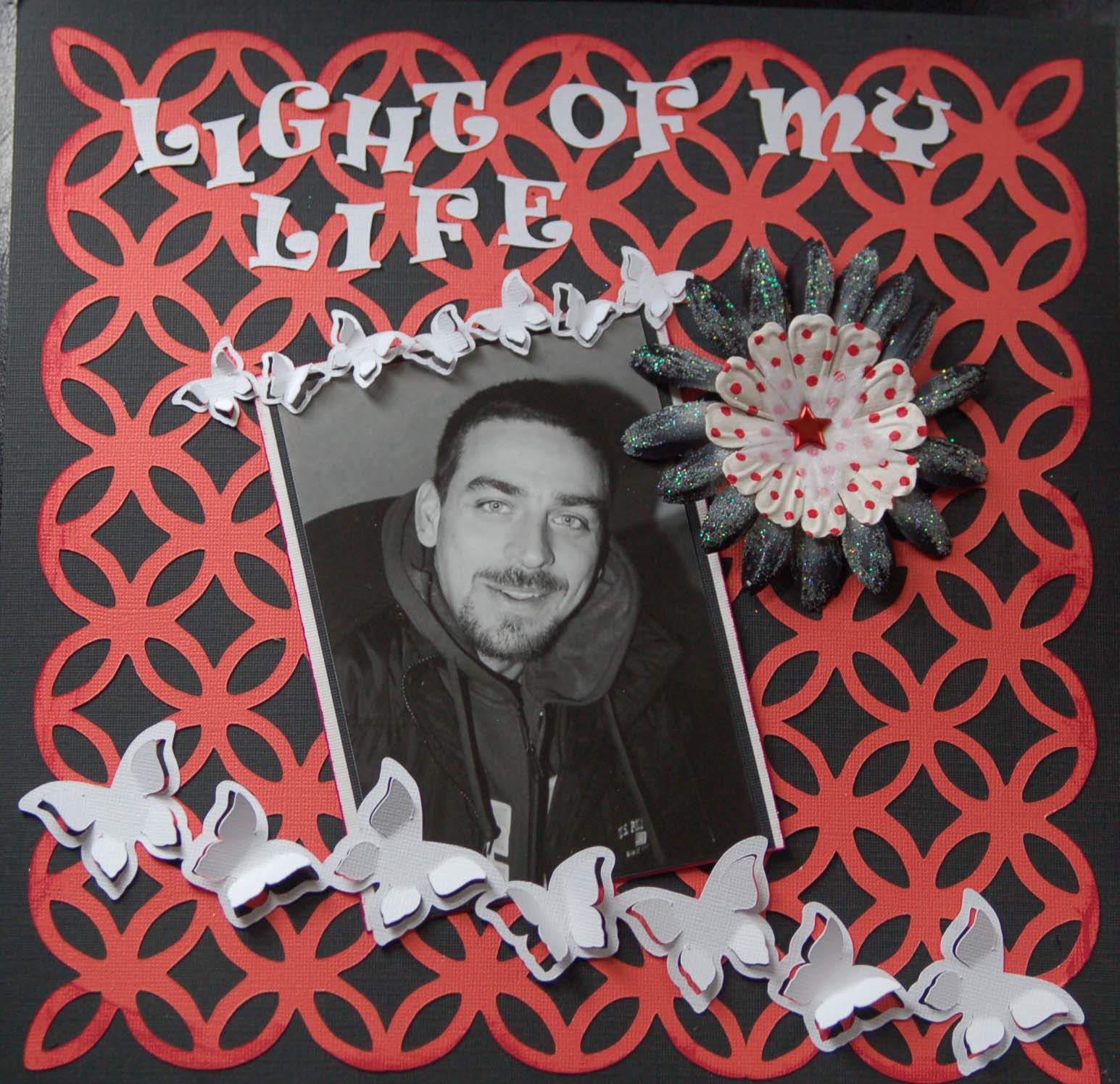
I did this layout of my DH, using my 3D Butterfly Border lk00125 and Circle Flower Mesh Jumble Background lk00040, I also used Doodle Bug Glitter on my Prima Flowers.  These two design's can be used on many project's layouts, cards, and you could even wrap this little butterfly border around a cupcake! Hope you enjoy using it!

Thursday, May 13, 2010

Looking for Creative Team Members

Hey There Everyone!! I am looking for a few Creative Team Members to use my designs in layout, cards or other craft project's. If interested email me at filekutzbylisajane@mediacombb.net